
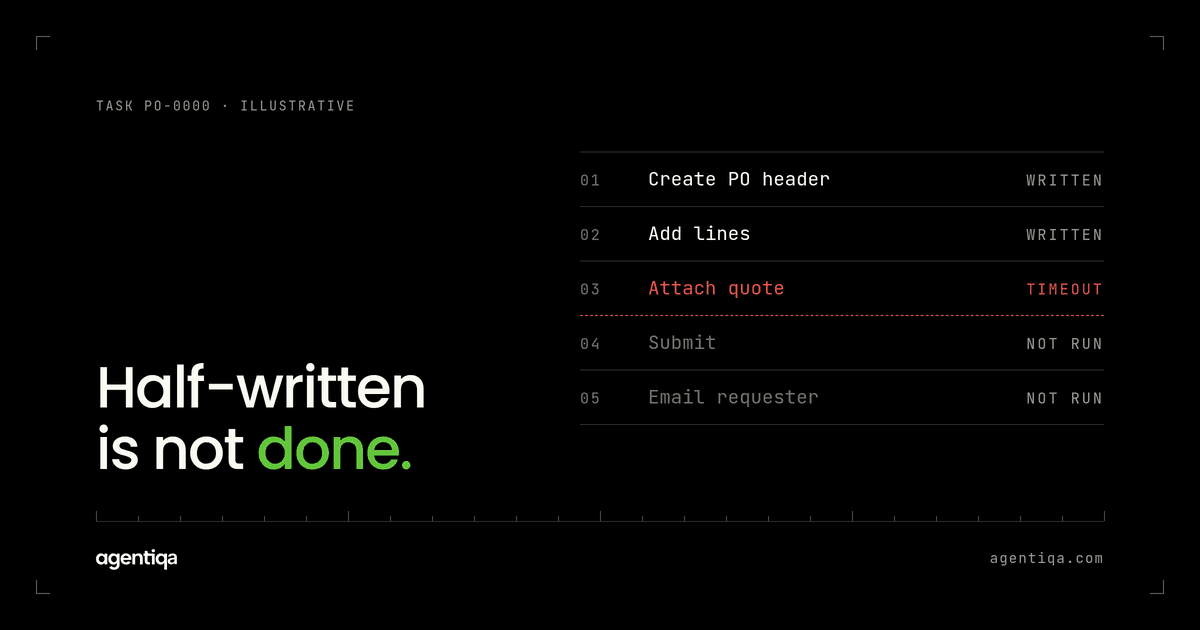
In short: a partial failure is when an AI agent completes some steps of a multi-step task and then stops, leaving a half-finished change in a customer's system: an order without its lines, a refund without its credit note, a contact moved to a new account but its deals left behind. To test for it, run each multi-step flow in a test environment, force a failure at every step in turn, and check the system afterwards. The right result is either the full change or a clean, reported state that someone can safely finish or undo. A half-written record that the agent calls "done" should stop the release.
Most agent testing looks at single actions: did the agent create the right record? Real agent work is rarely one action. It is a chain of writes across one or more systems, and chains break in the middle. This post covers how partial failures happen, what "rollback" can and cannot mean for an agent, and how to test it before a release.
What is a partial failure in an AI agent?
An agent task often looks like this:
- create a purchase order header;
- add three lines;
- attach the quote;
- submit for approval;
- email the requester.
If step 3 times out, steps 1 and 2 have already happened. The system now holds an order with lines but no quote, not yet submitted. Whether that is a problem depends on what happens next. If the agent retries from the start, you may get a second order (see duplicate writes and idempotency testing). If it gives up silently, the half-built order sits there. If it tells the requester the order is placed, you have a partial failure and a hallucinated success at once.
Partial failures are common in agents for a simple reason: the model decides the order of steps at run time, and each step is a separate API call that can fail on its own. There is usually no single transaction wrapping the whole task.
Why can't you just roll back?
In a database, a transaction either commits or rolls back. Most systems an agent writes into do not offer that across calls. An ERP, a CRM and an email server are three separate systems. Once an email is sent, it is sent. Once a record exists in a customer's ERP, removing it may need its own permission and leaves its own audit trail.
So for agents, "rollback" usually means one of three things:
- Compensating actions. The agent, or code around it, runs explicit undo steps: cancel the draft order, void the credit note, move the contact back.
- Resumable state. The agent records how far it got, and a retry continues from the last good step instead of starting over.
- Safe stopping points. The flow is designed so that any point where it can stop leaves a valid state, for example by building everything as a draft and making the final submit the only step with real effect.
Each of these is a design choice. Testing tells you whether the design holds up in practice. The runs below need a test environment you can reset between attempts; see AI agent test environment.
How do you test an AI agent for partial failures?
1. List the multi-step flows
Start with the flows that write more than once. For each, write the steps in order, which system each step touches, and whether the step can be undone. Mark the steps with effects outside your control, such as emails, payments or messages to suppliers. Those are the ones where a failure later in the flow hurts most.
2. Define the acceptable end states
For every step, write what the system should look like if the flow stops right after it. There are usually only two acceptable answers:
- the full change, after a successful retry or resume; or
- a known, reported partial state, such as "order saved as draft, not submitted, requester told it needs attention".
Anything else is a failure: orphaned records, a second copy, a submitted order missing data, or a success message.
3. Inject a failure at each step
Run the flow once per step, each time with a forced failure at that step: a timeout, a 502, a validation error, or a lost connection after the call succeeded on the server side. That last case matters most. The write happened but the agent did not get the response, so it cannot know whether to retry.
4. Read back the whole system
After each run, check every record the flow could have touched, not only the last one. Look for records that exist but should not, links between records that are missing, and statuses that do not match each other. Compare against the expected state for that step.
5. Check what the agent said
Compare the agent's final message, ticket comment or log entry with the actual state. If the order is a draft, the agent should say so. This is where many partial failures turn into incidents: the data problem is small, but nobody knows about it.
6. Test the retry and the undo
If the flow supports resume, run the retry and check that it finishes the job without repeating steps. If it uses compensating actions, check that they ran and that the system is back where it started, including side records like attachments, notes and history entries.
Which partial failures cause the most damage?
From the flows we see in procurement, finance, legal and supply chain, the costly ones tend to be:
- Header without lines, or lines without a header, in orders and invoices.
- One side of a pair. A credit note without the refund, a stock move out without the move in, a document filed but not linked to the matter.
- External side effects before the internal write. The supplier gets an email about an order that was never saved.
- Parent changed, children left behind. An account merged in the CRM while its open deals still point to the old one.
These rarely show up in a demo, because demos do not fail halfway.
What should block the release?
A useful starting rule:
- any end state that is not on your list of acceptable states;
- any success message when the flow did not finish;
- any duplicate after a retry;
- any external side effect, such as an email or payment, sent for a change that was not saved.
A slower recovery or a less elegant status message does not block. A half-written record that looks finished does.
How does this fit with the rest of your testing?
Partial failure tests extend normal flow tests. You first need a test for the happy path that reads back the written data, as described in how to test AI agents that write to your CRM or ERP. Then you rerun the same flow with failures at each step. Error and timeout checks on single calls are in how to test AI agent tool calls. Run these on every release, because a prompt or model change can reorder steps without anyone noticing, and the safe stopping points move with them. The same suite is the core of regression testing for AI agents.
How does Agentiqa help?
Agentiqa builds high-confidence release gates for vertical AI agents in high-liability domains such as procurement, legal, finance and supply chain. A gate runs the agent's critical flows, including runs with injected failures, reads back the written data, and stops the release when the result does not match what was expected, with the execution trace and the data diff. First release gates live within 7 minutes.
FAQ
What is a partial failure in an AI agent?
It is a task where the agent completed some writes and not others, leaving the target system in a state nobody intended. It usually happens when one step in a multi-step flow times out or errors and the agent has no safe way to finish or undo the work.
Can an AI agent roll back its own changes?
Only if the flow was built for it, with compensating actions or resumable state. Most business systems do not offer transactions across several API calls. Test the undo path as carefully as the main path, because it runs least often.
How is this different from duplicate writes?
Duplicates are about doing a step twice. Partial failures are about doing a task halfway. They often appear together: the agent fails at step 3, retries from step 1, and you end up with one complete order and one half-built one.
How many failure points should I test?
Start with every step in your three most important multi-step flows. Add more flows once those are stable.
Is there a free way to start?
Yes. The Community Edition is free for web apps and simple agentic workflows, with 20 runs a month that reset monthly. Extra credits can be bought any time. Pro is $39/month.
Next step
Pick your agent's longest flow and write down what the system should look like if it stops after each step. If you find steps where you are not sure, we map them with you in 20 minutes and show a release gate stopping a live failure.