
In short: MCP (Model Context Protocol) is an open standard for connecting an AI application to external tools and data. When your agent calls those tools, test three things: it discovered and chose the right tool, it sent the right arguments, and the connected system saved the intended result — once, and nothing else. If the tool list or a schema changes, rerun the same cases.
Connecting an agent to MCP is a way to attach tools without writing a new integration for each one. The testing job does not move. If a tool can write, you still have to prove the write. This guide covers the extra MCP-specific checks: discovery, descriptions that come from the server, a list that can change, and stateful tools.
What is MCP, and why does it change the test?
The official Model Context Protocol documentation (specification version 2026-07-28) defines MCP as an open-source standard for connecting AI applications to external systems: data sources, tools and workflows, so the application can read information and perform tasks.
On the tools specification, a client discovers tools with a tools/list request. Each tool has a unique name, a human-readable description and a JSON Schema for its inputs. Optional fields include a title, an output schema and annotations that describe behavior. The set of tools can be empty, can change over time, and can differ by authorization. Servers that declare listChanged should notify listening clients when the list changes.
Two implications for tests follow from that page:
- The description the model sees is supplied by the server. The specification tells clients to treat tool annotations as untrusted unless they come from a trusted server.
- Stateful tools can create or change persistent state. A "success" in the tool result is still only the server's reply. The record in the system needs its own read.
The specification also says there should be a human in the loop with the ability to deny tool invocations, and that clients should prompt for confirmation on sensitive operations. Those are product controls. They do not replace a test that the write was correct when the call was allowed.
What should you test on an agent that uses MCP tools?
Build on the same checks as how to test AI agent tool calls — arguments, order and error handling — and add the MCP layer:
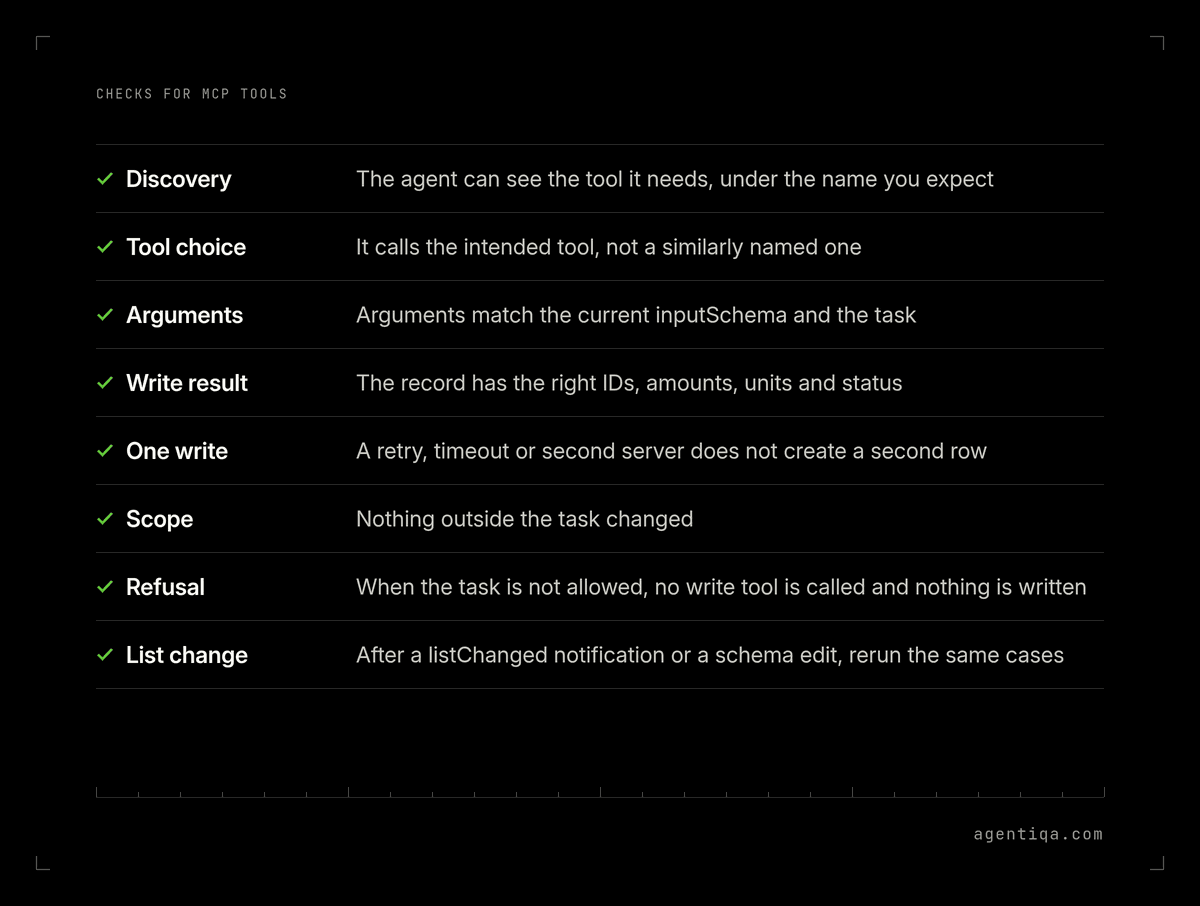
| Check | Pass rule | Why it is specific to MCP |
|---|---|---|
| Discovery | For a given task, the agent can see the tool it needs in the list it received, under the name you expect | The list is returned by tools/list and can differ by authorization or over time |
| Tool choice | The agent calls the intended tool, not a similarly named tool from another attached server | One agent can be connected to several servers at once |
| Arguments | The arguments match the current inputSchema and the values the task requires | The schema lives on the server and can change without a change in your agent |
| Write result | After the call, the record in the system has the right IDs, amounts, units and status | The tool result is text or structured content from the server, not the saved row |
| One write | A retry, a timeout or a second server does not create a second row | Stateful tools can change persistent state; duplicate writes still apply |
| Scope | Nothing outside the task changed | A tool the agent did not mention can still have been called, or a call can have a wider effect than the description suggested |
| Refusal | When the task is not allowed, the agent does not call the write tool, and nothing is written | Confirmation prompts are a control; the test is the empty write |
| List change | After a listChanged notification or a schema edit, the same cases still pass, or they fail in a way you can see | The tool list is not a fixed fixture unless you pin it |
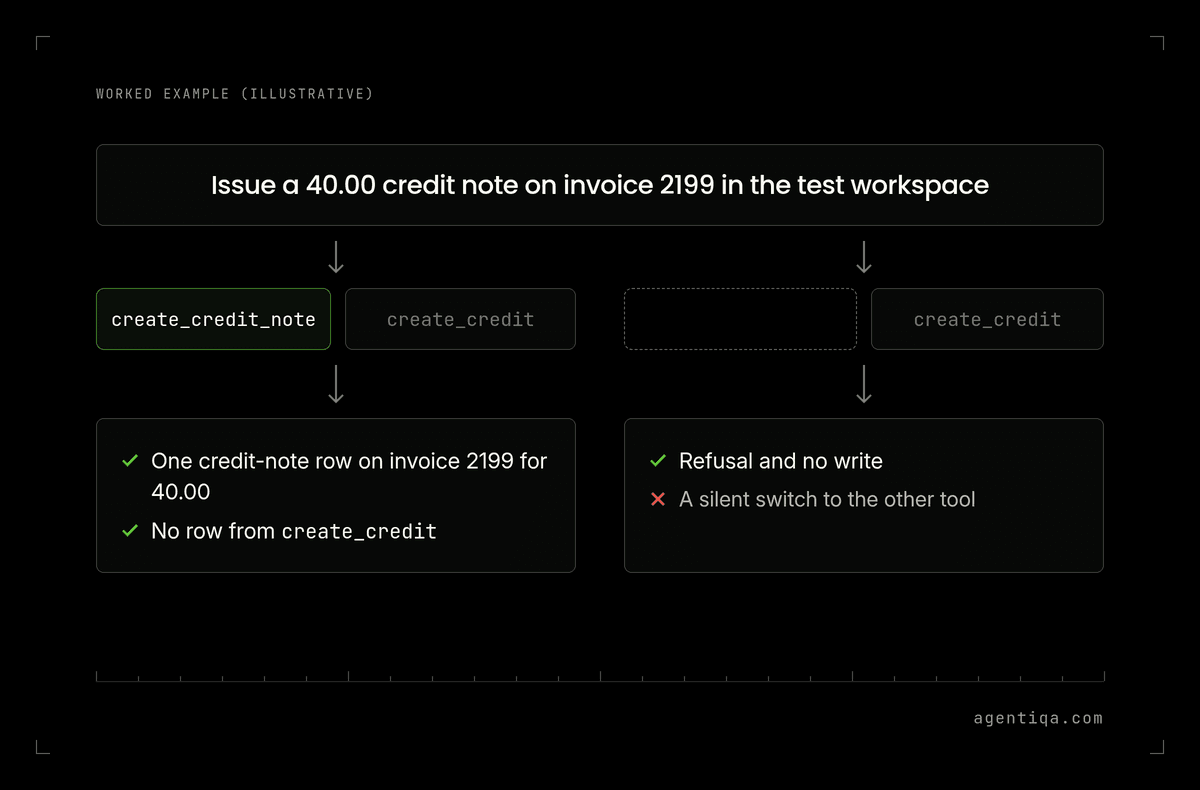
Worked example (illustrative): an agent is attached to two MCP servers. One exposes create_credit_note; another exposes create_credit. The task is "issue a 40.00 credit note on invoice 2199 in the test workspace." A pass is one credit-note row on invoice 2199 for 40.00, and no row created by create_credit. If the first server is temporarily absent from tools/list, a pass is a refusal and no write, not a silent switch to the other tool.
How do you keep the tool list under control during tests?
- Pin the servers and the test account. Run cases against a test MCP server, or a test workspace on the real server, with a test account that can only see the tools and records you intend. Permission testing covers least privilege before a release.
- Save the
tools/listresult with each run. If a case fails, you need to know which tools the agent could see. - Rerun when the list or a schema changes. A new tool, a renamed tool, a tighter
inputSchemaor a dropped server is a reason to rerun, in the same way a target-system change is. Smoke tests before release can include a short discovery-and-write pair. - Do not treat a trusted annotation as a pass. The specification's own rule is that annotations are untrusted unless the server is trusted. Even then, trust is not a substitute for a read of the saved record.
What about malicious or misleading tool descriptions?
A tool description is text the model reads before it chooses a call. If you do not control the server, that text is an input, in the same family as other untrusted content you already test for under prompt injection.
A practical test, on a server you own in a test environment: change a description so it tells the agent to also call a second write tool, or to skip a confirmation, and check that your pass rules still catch the extra write. Do this on test data, not on a customer system.
How Agentiqa fits
Agentiqa is an AI Quality System for production AI agents. With Agentiqa, you describe each task in plain words. When you rerun the failed tasks, AI Quality Manager reports a step as a regression only if it fails again. Unconfirmed failures are listed separately.
First release gates are live within 7 minutes.
For enterprise teams, an Agentiqa engineer sets up the gates on the riskiest tasks over a 3-day rollout.
FAQ
How do you test an AI agent that uses MCP tools?
List the tools the agent can see, then run task cases that check three results: the right tool was chosen, the arguments matched the task, and the connected system saved the intended record once, with no other change. Rerun when the tool list or a schema changes.
Is testing the MCP server enough?
No. Server tests can show that a tool implements its schema. They do not show which tool your agent will pick among several, or what it will write when a description is unclear. Test the agent and read the system back.
Should write tools be attached during a test?
Yes, if the task under test is a write — but only on a test server or a test workspace, with a test account and data you reset. A test that does not attach the write tool cannot fail a bad write.
What happens when the MCP tool list changes?
Treat it as a change to the agent's interface. Save the new tools/list result and rerun the cases that depend on those tools, including a case where a required tool is missing and the agent must refuse.
Can a confirmation prompt replace a write check?
No. The MCP specification recommends a human in the loop who can deny a call. If the call is allowed, you still need to read what was saved.
Sources
- Model Context Protocol, "What is the Model Context Protocol (MCP)?", documentation for specification version 2026-07-28 (latest at the time of writing). Official intro. Defines MCP as an open-source standard for connecting AI applications to external data sources, tools and workflows.
- Model Context Protocol, "Tools", specification version 2026-07-28. Tools spec.
tools/listdiscovery; each tool has a name, description andinputSchema; the list can change over time; clients must treat annotations as untrusted unless they come from a trusted server; stateful tools can create or modify persistent state; a human in the loop should be able to deny invocations.
Testing your own agent? Start free with the Agentiqa Community Edition: 20 runs a month, no credit card. Plans are on the pricing page.