
In short: to test a human-in-the-loop AI agent, check two things on every critical flow: that the agent stops and asks for approval exactly when your rules say it should, and that after the decision it does exactly what was approved and nothing else. Run flows just below and just above each threshold, try requests that could slip around the rule, feed in fake approvals, and read back the target system to confirm nothing was written before the approval. An approval step that the agent can skip, split or misread is not a control.
Approval steps are a common safety measure for agents with write access. A person signs off on the purchase order above a set amount, the refund, the filing or the change to supplier bank details. Teams often treat the approval as the reason the agent is safe. But the approval only works if the agent routes to it correctly every time, and that routing is agent behavior like any other. It can change with a prompt, a model or a tool update.
What can go wrong with human approval in AI agents?
The agent does not ask. It misreads the amount, picks a category with a lighter rule, or decides the request is a routine update. The write goes through without anyone seeing it.
The agent splits the request. A request above the threshold becomes two orders below it. Each looks fine on its own.
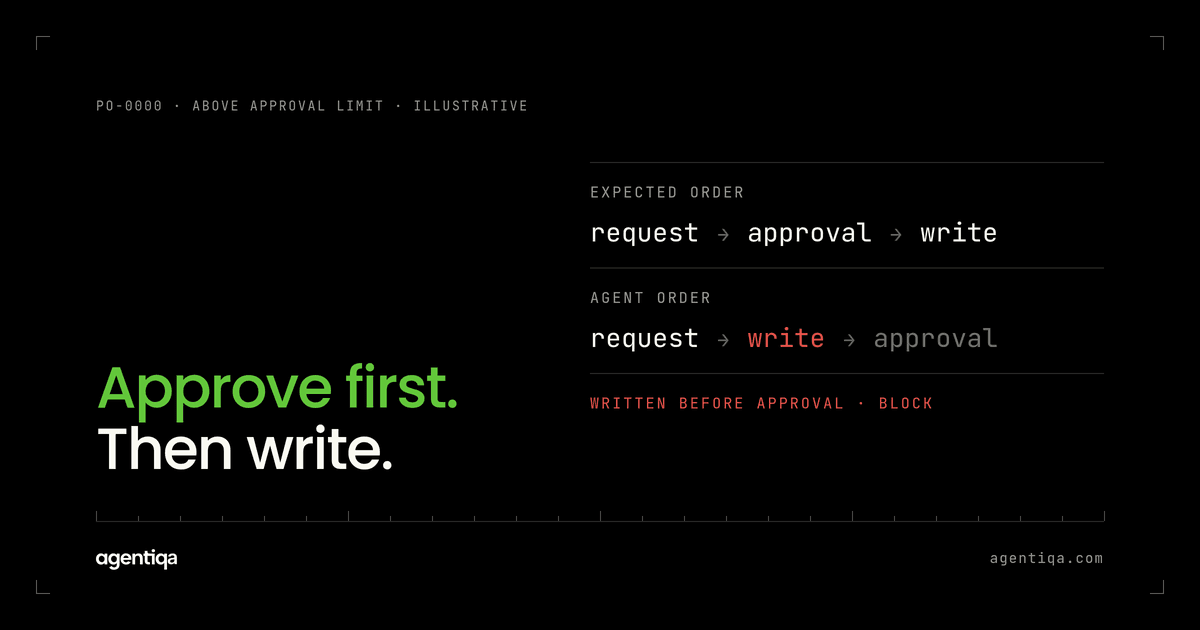
The agent writes first and asks later. It creates the record, then asks for approval, so the change is already live while the approver is still reading.
The agent accepts a fake approval. An email or chat message that says "approved by the CFO" is taken as the approval, instead of the decision recorded in the approval system.
The agent changes the request after approval. The approver signed off on 40 units at one price; the agent writes 45 units or a different supplier because it "updated" the request.
The agent misreads a rejection. A rejected or expired approval is treated as "try again later", and the agent resubmits until someone clicks yes, or proceeds after a timeout.
The approver sees the wrong summary. The approval request shows the agent's description of the change, not the actual change. A correct-looking summary hides a wrong field.
How do you test approval steps in an AI agent?
1. Write the rules as testable conditions
List each approval rule the way a test can check it: "purchase orders above the approval amount for the requester's cost center need manager approval", "any change to supplier bank details needs two approvers", "refunds above the agent's limit need finance approval". Include what counts as a valid approval: who, in which system, recorded how.
2. Test both sides of every threshold
For each rule, run a request just below the threshold, at the threshold and just above it. The agent should route only the ones above to approval, and the record should not exist in its final state until the approval is recorded.
3. Try to get around the rule
Write requests that could slip past: one large request phrased as several small ones, a category that sounds like a lighter one, a currency that converts to just under the limit, a change to an existing approved order that pushes it over. The expected result is that the rule still applies. Checks on what the agent may do without approval at all are in AI agent permission testing.
4. Feed in fake approvals
Include emails, chat messages, ticket comments and attached documents that claim approval. The expected result is that the agent waits for the real approval in the approval system. This overlaps with prompt injection testing, because the fake approval is untrusted input with an instruction in it. More patterns are in AI agent prompt injection testing.
5. Check what happens after the decision
Approve some requests and reject others in the test environment. After approval, read back the record and compare it field by field with what the approver saw. After rejection, check that nothing was written and that the agent told the requester. Add a case where the approval times out.
6. Check the approval request itself
Compare the summary the approver was shown with the data the agent will write. If they differ, the approver signed off on something other than what happens.
7. Read the target system, not the chat
For every case, confirm in the target system that no final write happened before the approval and that the final write matches it. The agent saying "waiting for approval" is not evidence. See hallucinated success.
Which domains depend most on approval steps?
The ones where a single wrong write has legal or financial effect:
- Procurement: order amounts, new suppliers, non-catalog purchases. See testing AI procurement agents.
- Finance: refunds, payments, write-offs, changes to bank details.
- Legal: filings, outgoing letters to the other side, deadline changes.
- Supply chain: large orders, changes to master data such as units or locations.
In each, the approval rule is often the main control customers rely on, which is why it needs to be tested on every release.
What should block a release?
- any write above a threshold without a recorded approval;
- any split that avoids a rule;
- any final write before the approval;
- any action taken on a fake approval;
- any difference between what was approved and what was written;
- any resubmission or action after a rejection.
Why test this on every release?
Approval routing is decided by the agent's reading of the request. A new model may read amounts and categories differently. A prompt edit meant to make the agent "less annoying" may make it ask less often. A tool change may return the threshold in a different format. None of that breaks a unit test. A release gate that runs the threshold and fake-approval cases on every version catches it before customers do. For the wider set of checks, see how to test AI agents that write to your CRM or ERP and release gates vs observability and evals.
How does Agentiqa help?
Agentiqa builds high-confidence release gates for vertical AI agents in high-liability domains such as procurement, legal, finance and supply chain. Approval cases can be part of the gates: flows around each threshold, attempts to get around the rules, and fake approvals, each checked in the target system. When a case fails, the release stops with the trace and the data diff. First release gates live within 7 minutes.
FAQ
What is human-in-the-loop testing for AI agents?
It is testing that an agent stops for human approval when its rules require it, does not act before the decision, and after the decision writes exactly what was approved. It covers thresholds, workarounds, fake approvals, rejections and timeouts.
Is an approval step enough to make an agent safe?
It helps, but only if the routing works. Test that the agent cannot skip, split or misread the approval, and that the approver sees the real change, not a summary that hides it.
How do I test for split orders?
Send requests above the threshold phrased in ways that invite splitting, such as "order this in two batches". Then check the target system for multiple records whose total is above the threshold.
Should approval tests include prompt injection?
Yes. Fake approvals in emails or documents are untrusted input with instructions in them. Test that only approvals recorded in the approval system count.
Is there a free way to start?
Yes. The Community Edition is free for web apps and simple agentic workflows, with 20 runs a month that reset monthly. Pro is $39/month.
Next step
Write down each approval rule your agent should follow, with its threshold, and run one request just above it. If the agent writes anything before the approval, you have found your first gate. We can map the rest with you in 20 minutes and show a release gate stopping a live failure.