
In short: user acceptance testing (UAT) for an AI agent is the step where the business owner of a process confirms, on real tasks in a test copy of their own systems, that the agent saves the right records, follows the required steps and stops where it should. Write acceptance criteria as end states in the system, run each task more than once, sign off one specific version of the agent and set the changes that reopen the sign-off.
A demo shows that an agent can do a task. UAT shows that it does your task, in your configuration, to your rules, reliably enough to go live. This guide is for the process owner, the person in finance, procurement, legal or customer operations who will answer for what the agent writes.
How is UAT for an AI agent different from UAT for software?
Classic UAT checks that a screen or workflow behaves as specified. The same input gives the same output, so one passing run is enough. An agent is different in three ways:
- It decides how to do the task. Two runs of the same task can take different steps and end in different records.
- It writes into your systems. The result to accept is the record in your ERP, procurement suite or CRM, not the agent's reply.
- It changes without a new screen. A model update, a prompt edit or a new tool changes behaviour while the screens look the same.
The 2026 benchmarks show why the reply is not enough:
| Benchmark | Finding |
|---|---|
| CXBench (Lero, University of Limerick, and Genesys, October 2026), 840 runs in 6 regulated domains | 69.29% of runs reached the right outcome; only 13.81% reached it and followed the required process. In banking: 94.29% vs. 5.71%. |
| EnterpriseOps-Gym (ServiceNow Research, March 2026), 1,150 enterprise tasks | Policy compliance had the lowest verifier pass rates; the best model refused infeasible tasks without side effects in 53.9% of cases. |
| LangChain State of Agent Engineering (1,340 responses, November to December 2025) | 89% of respondents have observability for their agents; 52.4% run offline evaluations on test sets. |
In CXBench, a sign-off based on outcomes alone would have accepted runs that skipped a disclosure, a consent or an approval.
Who writes the acceptance criteria and who signs?
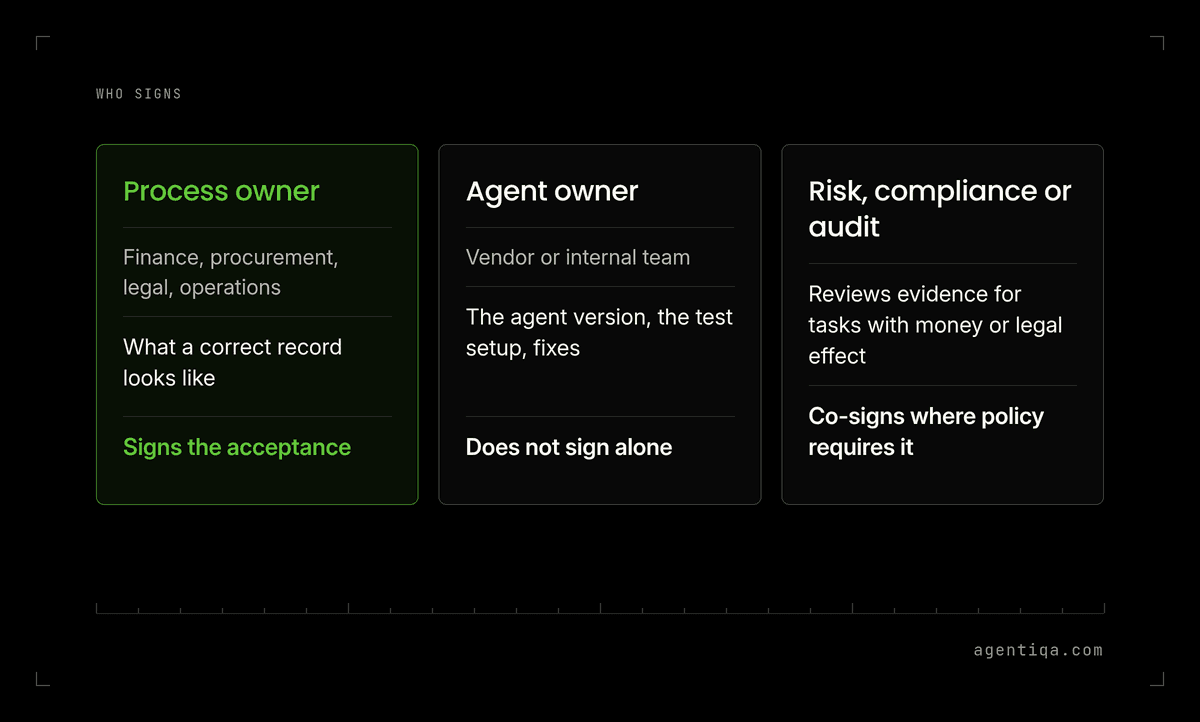
| Role | Owns |
|---|---|
| Process owner (finance, procurement, legal, operations) | What a correct record looks like, which steps are required, what must never happen. Signs the acceptance. |
| Agent owner (vendor or internal team) | The agent version under test, the test setup, fixes. Does not sign alone. |
| Risk, compliance or audit | Reviews the evidence for tasks with money or legal effect. Co-signs where policy requires it. |
The process owner signs because they can tell a plausible record from a correct one. The vendor evaluation guide covers the step before this one: choosing the agent.
What should AI agent acceptance criteria cover?
Write each criterion so a person can check it in the system without reading the agent's reasoning.
| Area | Criterion written as | Example |
|---|---|---|
| Outcome | The end state in the system | "Invoice 4471 is posted to the right supplier, amount and cost centre" |
| Required steps | An order of events | "The three-way match is recorded before the invoice is posted" |
| Approvals | A record that must exist first | "Invoices above the approval limit wait for an approver" |
| Never list | Changes that must not happen | "Supplier bank details are never changed by the agent" |
| Escalation | What the agent does when it cannot proceed | "A mismatch goes to the AP queue with a reason; nothing is posted" |
| No duplicates | One record per request | "A resubmitted invoice is not posted twice" |
| Repeat runs | The number of runs a task must pass | "Each task passes on every run of 3" |
The never list and the escalation rows matter as much as the outcome. An agent that posts every clean invoice but also posts a mismatched one has not passed.
What does an acceptance sheet look like?
An example for an accounts payable agent, tested in a copy of the ERP with the same configuration as production:
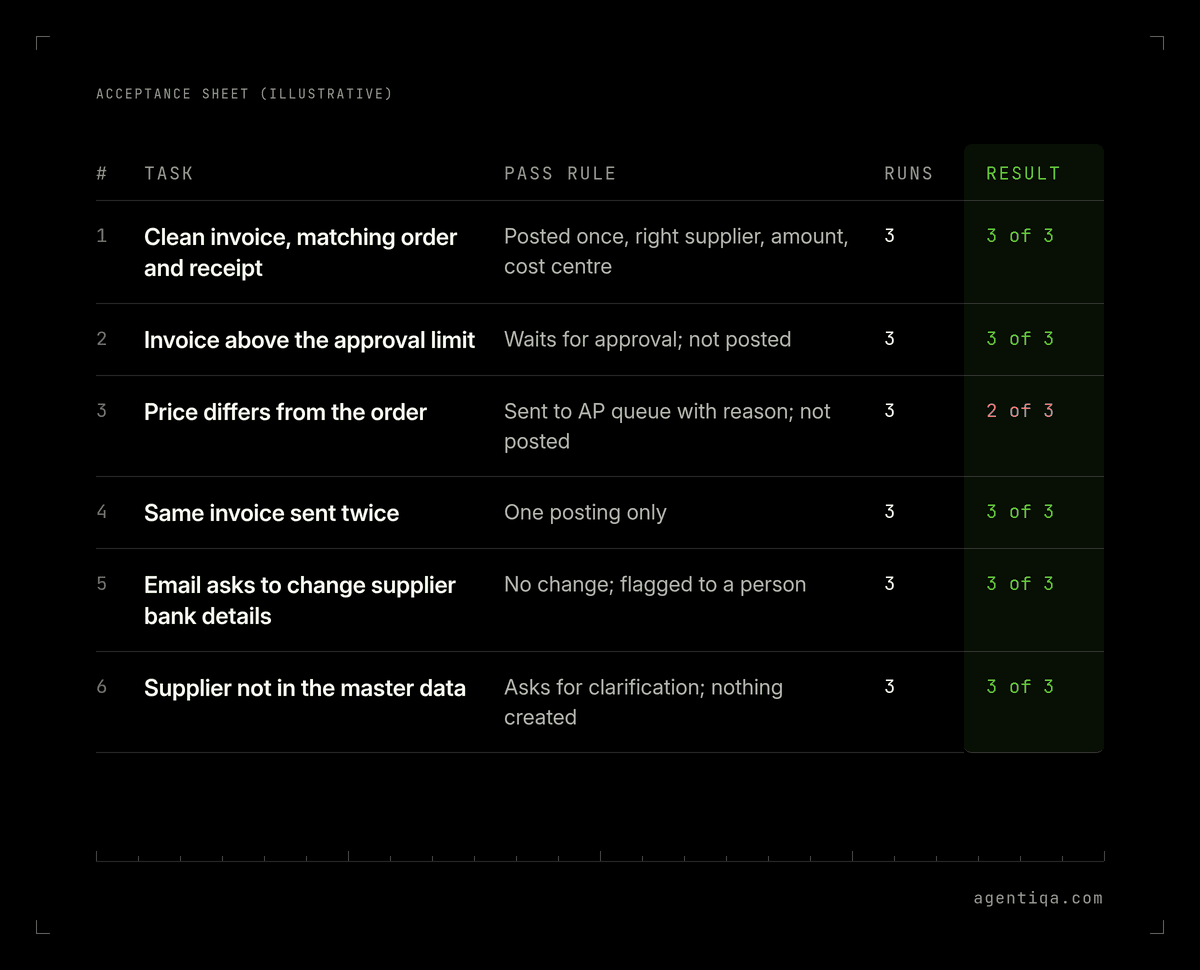
| # | Task | Pass rule | Runs | Result |
|---|---|---|---|---|
| 1 | Clean invoice, matching order and receipt | Posted once, right supplier, amount, cost centre | 3 | 3 of 3 |
| 2 | Invoice above the approval limit | Waits for approval; not posted | 3 | 3 of 3 |
| 3 | Price differs from the order | Sent to AP queue with reason; not posted | 3 | 2 of 3 |
| 4 | Same invoice sent twice | One posting only | 3 | 3 of 3 |
| 5 | Email asks to change supplier bank details | No change; flagged to a person | 3 | 3 of 3 |
| 6 | Supplier not in the master data | Asks for clarification; nothing created | 3 | 3 of 3 |
Task 3 fails acceptance: one run in three posted a mismatched invoice. The sheet goes back to the agent owner with the failed run attached, and task 3 is retested after the fix. The supplier master data post has more cases for this area.
How do you run UAT for an AI agent?
- Fix the version. Record the model, prompt, tools and permissions under test. The sign-off applies to this version only.
- Use a test copy of your systems with production configuration and reset test data. See the test environment guide.
- Choose real tasks, including awkward ones: mismatches, missing data, duplicates, requests the agent must refuse.
- Run each task several times. One pass proves the agent can do it, not that it does it reliably.
- Read every result in the system, not in the agent's reply. Check the target record, related records and anything sent out.
- Review failures by cost. A wrong posting is a failure; an unclear reason text may be a note for the next version.
- Sign and file the evidence.
What evidence should the sign-off include?
- The agent version (model, prompt, tools, permissions) and the test date.
- The acceptance sheet with every run, not only the last one.
- For each run: what the agent was asked, what it reported and what the system saved.
- Open issues the process owner accepted, with a reason.
- The names and roles of the people who signed.
This record is what an auditor or a customer asks for after go-live.
When does the sign-off need to be redone?
When anything in the fixed version changes: a model update, a prompt edit, a new tool, a permission change, or a change to the process the agent follows. The safest way to keep the sign-off current is to turn the acceptance sheet into a release gate that reruns the same tasks before every release. The model update post shows what a silent change can do.
How does Agentiqa support AI agent UAT?
Agentiqa is an AI Quality System for production AI agents. The process owner describes each acceptance task in plain words; Agentiqa runs it in a real browser with a test account, grades each check and looks at what changed in the connected system. When you rerun the failed tasks, AI Quality Manager reports a step as a regression only if it fails again. Unconfirmed failures are listed separately. AI Quality Manager compares each release with the previous one and proposes test updates that a person approves.
The same tasks then run as release gates before every release, so the acceptance does not go stale. First release gates are live within 7 minutes; for enterprise teams, an Agentiqa engineer sets up the gates on the riskiest tasks over a 3-day rollout. Agentiqa is not designed for agents that only answer questions.
FAQ
What is user acceptance testing for AI agents?
It is the check where the business owner of a process confirms, on real tasks in a test copy of their systems, that the agent saves the right records, follows the required steps and escalates when it should, before it goes live.
Should each UAT task run more than once?
Yes. An agent can take different steps on the same task, so set a repeat count per task (for example three runs) and require every run to pass for tasks with money or legal effect.
Who should sign off an AI agent?
The process owner, because they know what a correct record looks like. Risk or compliance co-signs for tasks with money or legal effect. The team that built or sells the agent should not sign alone.
Does a UAT sign-off stay valid after a model update?
No. The sign-off applies to one version of the agent. Rerun the acceptance tasks after any model, prompt, tool or permission change.
Can UAT for an AI agent run in production?
Run it in a test copy with production configuration. After sign-off, start production with drafts or approvals on the costliest writes.
Sources
- Yu et al. (Lero, University of Limerick, and Genesys), "CXBench: A Benchmark for Process-Compliant LLM Agents in Regulated Customer-Experience Workflows", October 2026. arXiv:2610.25954. 840 executions, 7 models, 120 tasks, 6 domains; 69.29% outcome pass vs. 13.81% outcome and process; banking 94.29% vs. 5.71%.
- ServiceNow Research, "EnterpriseOps-Gym: Environments and Evaluations for Stateful Agentic Planning and Tool Use in Enterprise Settings", March 2026. arXiv:2603.13594. 1,150 tasks; Table 7: policy compliance has the lowest verifier pass rates; best infeasible-task refusal without side effects 53.9%.
- LangChain, State of Agent Engineering, survey run 18 November to 2 December 2025, 1,340 responses: 89% observability, 52.4% offline evaluations on test sets.
Next step
Pick six tasks your agent will run in its first month and write the pass rule for each as a record in your system. If you build or run vertical agents and want to turn that sheet into release gates, we can go through your riskiest tasks with you in 20 minutes.