
In short: to verify what an AI agent changed, read the connected system before and after each test task and compare the two states. Sort every difference into five groups: expected, missing, wrong value, duplicate and outside the task. Then check that the required steps happened in the right order. The agent's own reply is a claim. The saved state is the evidence.
An agent that answers "Done, the refund is issued" may have issued it twice, issued it to the wrong order, or updated a second customer along the way. None of that shows up in the reply. This guide shows how to check the record itself, with a worked example you can copy.
Why isn't the agent's reply enough?
Two 2026 benchmarks graded agents on what actually happened in the system, not on what the agent said:
| Benchmark | What it measured | Result |
|---|---|---|
| CXBench (University of Limerick and Genesys, October 2026): 120 tasks, 6 regulated domains, 7 models, 840 runs | Runs that reached the right final outcome vs. runs that also followed the required process | 69.29% passed the outcome check; 13.81% passed both. 80.07% of outcome-passing runs failed the process checks |
| CXBench, banking domain | Same comparison | 94.29% outcome pass vs. 5.71% outcome and process |
| EnterpriseOps-Gym (ServiceNow Research, March 2026): 1,150 tasks, 14 models | Final database state checked for goal, integrity, permissions and side effects | Best model, Claude Opus 4.5, completed 37.4% of tasks |
In CXBench, an outcome-only check would have passed a run that reached the right result by skipping a required step. In banking, the gap between "right result" and "right result, done correctly" was almost the whole domain.
What counts as a change?
Before you can diff, list all the things the agent can touch for a task:
- Records it creates: orders, tickets, invoices, contacts, notes.
- Fields it updates: status, amount, owner, address, due date.
- Records it deletes or closes.
- Messages it sends: email, chat, SMS, notifications to customers.
- Requests it raises: approvals, refunds, payments, follow-up tasks.
- Files it writes: documents, exports, attachments.
Then write the second list, the one that is easy to skip: what must not change. Other customers' records, fields outside the task, closed periods, anything the agent's role should not reach.
How do you check what an AI agent changed?
Use the same five steps for every test task.
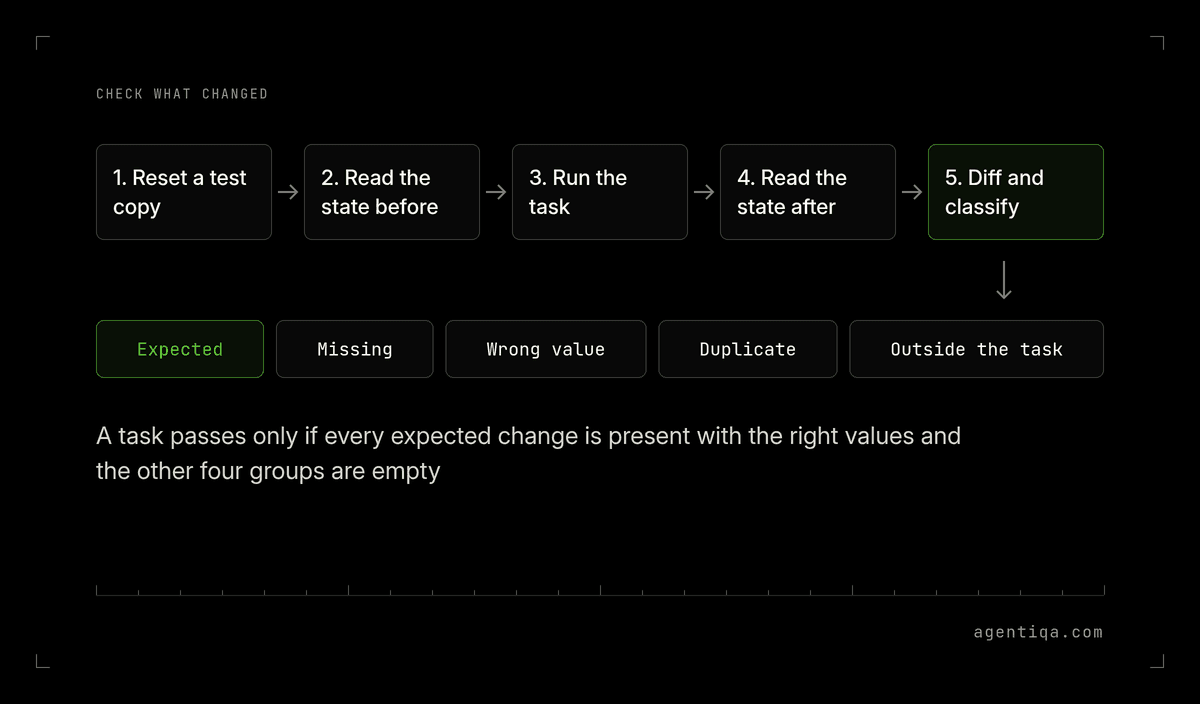
- Reset a test copy of the system to a known state with fixed test data.
- Read the state before. Export the records in scope: the target record, related records (the same customer, the same order, linked invoices) and outbound queues such as sent email.
- Run the task through the agent exactly as a user would.
- Read the state after with the same export.
- Diff and classify every difference:
| Group | What it means | Example |
|---|---|---|
| Expected | The change the task asked for | Refund of 40.00 on order 1182 |
| Missing | An expected change that did not happen | Agent said "refund issued", no refund row exists |
| Wrong value | The change happened with the wrong data | Refund of 400.00, or on order 1128 |
| Duplicate | The same change happened more than once | Two refund rows after a retry |
| Outside the task | Any change nobody asked for | Customer's email address overwritten |
A task passes only if every expected change is present with the right values and the other four groups are empty. The error types post covers each group in depth, including duplicate writes and false "done" reports.
What does the diff look like for a real task?
Task given to a support agent: "The customer on order 1182 got a damaged item. Refund 40.00 and send them a confirmation."
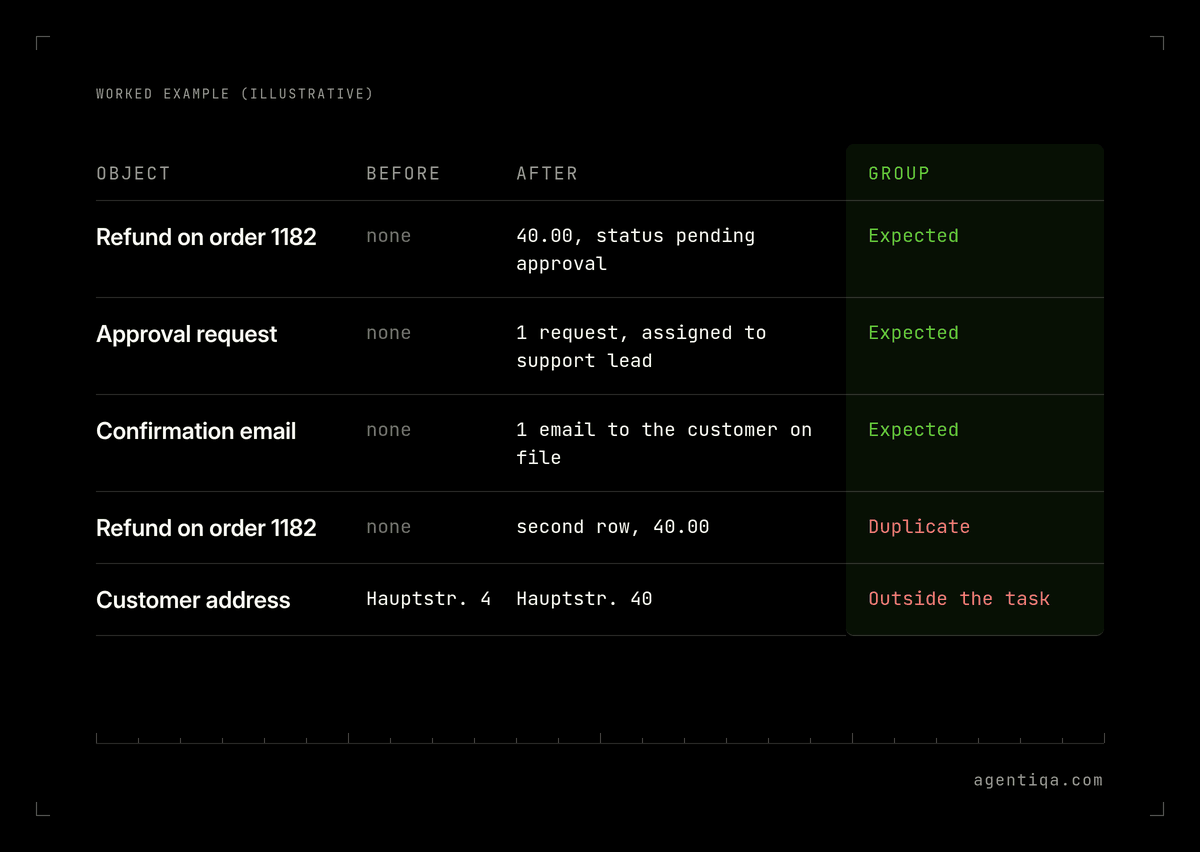
| Object | Before | After | Group |
|---|---|---|---|
| Refund on order 1182 | none | 40.00, status pending approval | Expected |
| Approval request | none | 1 request, assigned to support lead | Expected |
| Confirmation email | none | 1 email to the customer on file | Expected |
| Refund on order 1182 | none | second row, 40.00 | Duplicate |
| Customer address | Hauptstr. 4 | Hauptstr. 40 | Outside the task |
The agent's reply for this run was "Refund issued and confirmation sent." Both statements are true. The run still fails on two rows.
How do you catch changes outside the task?
Make the "after" read wider than the task. If you only read the target record, you will only ever see expected, missing and wrong-value changes. To see the rest:
- Read the whole customer, not only the order.
- Read outbound queues, so a message to the wrong person shows up.
- Read an audit or change log if the system has one. It lists changes you did not think to export.
- Include one record the agent has no reason to touch in every test and confirm it is unchanged.
Does the order of steps matter?
Yes, when your process has rules. "Refund 40.00" can reach the right final state in a way that breaks policy: the refund went out before the approval, or the confirmation was sent before the refund existed. That is the gap CXBench measured.
Check order from the system's own timestamps or change log where you can, and from the agent's trace where you cannot. Write each rule as a pair: "approval request exists before the refund is submitted", "identity check happens before the address changes".
What if you can't read a system back?
Some systems give the agent write access but give the test no way to read the result: a partner portal, a phone call, an email to an outside address. Mark those checks unverified, never passed. Then either add a read path (a test inbox, a sandbox account at the partner, an export) or keep a person approving that step until you can check it.
How do you repeat this for every release?
A model update, a prompt change or a new tool can change what the agent writes. Rerun the same tasks against the same reset data before every release and compare the diffs with the last approved run. A new duplicate or a new change outside the task is a regression even if the task "passed" by its reply. The release gate guide shows how to turn these checks into a go/no-go decision, and the test environment guide covers resettable test data.
How Agentiqa fits
Agentiqa is an AI Quality System for production AI agents. You describe each task in plain words; Agentiqa runs it in a real browser with a test account, grades each check and looks at what changed in the connected system. When you rerun the failed tasks, AI Quality Manager reports a step as a regression only if it fails again. Unconfirmed failures are listed separately.
First release gates are live within 7 minutes. Agentiqa's release gates run before release, not in production. Agentiqa is not designed for agents that only answer questions.
For enterprise teams, an Agentiqa engineer sets up the gates on the riskiest tasks over a 3-day rollout.
FAQ
How do I know what my AI agent actually changed?
Read the system before and after the task and compare. Classify each difference as expected, missing, wrong value, duplicate or outside the task. The agent's reply is not evidence of a change.
What is an AI agent side effect?
Any change in a connected system that the task did not ask for: a second record after a retry, an overwritten field, a message to the wrong person. Find them by reading more than the target record after each test.
Can I check changes from the agent's trace instead of the system?
The trace shows what the agent tried. It does not show what the system saved. Use the trace for step order when the system has no timestamps, and the system itself for the result.
Should the test run in production?
No. Use a test copy with the same configuration and fixed test data that you reset before every run, so every diff starts from the same state.
Sources
- Yu et al. (Lero, University of Limerick, and Genesys), "CXBench: A Benchmark for Process-Compliant LLM Agents in Regulated Customer-Experience Workflows", October 2026. arXiv:2610.25954. 120 tasks, 6 domains, 7 models, 840 executions; 69.29% outcome pass, 13.81% outcome and process pass; 80.07% of outcome-passing runs failed process checks (false-passes); banking 94.29% vs. 5.71%.
- ServiceNow Research, "EnterpriseOps-Gym: Environments and Evaluations for Stateful Agentic Planning and Tool Use in Enterprise Settings", March 2026. arXiv:2603.13594. 1,150 tasks, 14 models; best result 37.4% (Claude Opus 4.5); final-state verifiers for goal completion, integrity, permissions and side effects.
Testing your own agent? Start free with the Agentiqa Community Edition: 20 runs a month, no credit card. Plans are on the pricing page.